How it works
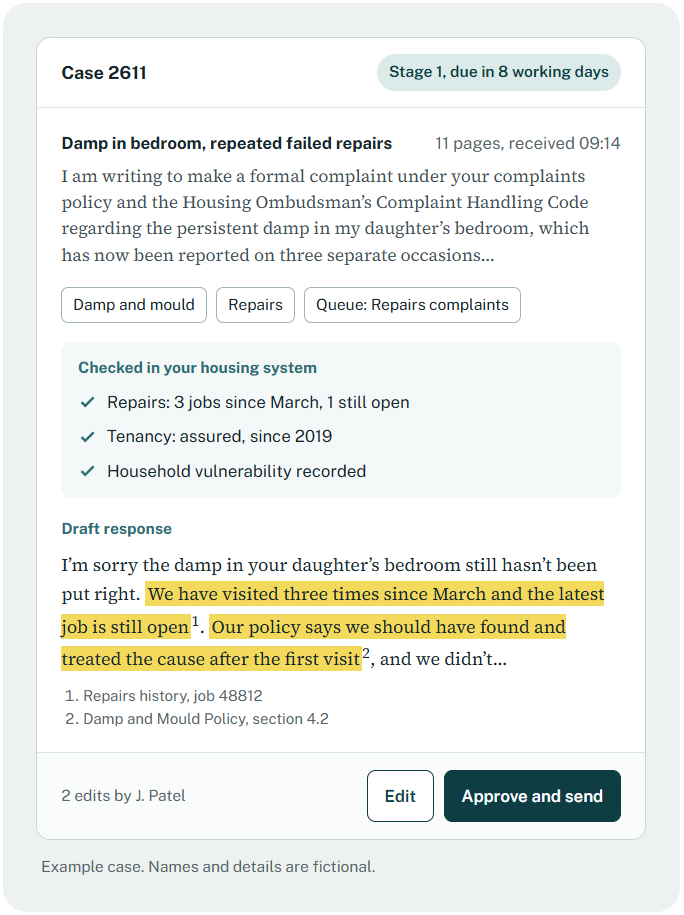
Each complaint is read as it arrives, checked against your housing system and drafted from your policies and the Complaint Handling Code. Your officer makes the call. Then you see what to fix, so the same complaints stop coming back.
Complaints have changed. Your team hasn’t got bigger.
Residents can now write a detailed, legally referenced complaint in minutes, quoting the Code, housing law and your own policies back to you. That’s their right, and plenty of those complaints are fair.
Each one still has to be acknowledged, investigated and answered properly. The Code gives you 10 working days at stage 1 and 20 at stage 2. Rushed replies get escalated. Late ones do too.
The answer isn’t to push back harder. It’s to respond with the same care and evidence, every time.
From inbox to answered, with a person in charge throughout
The AI does the reading, checking and first drafting. Your officers do the judging.
Step 1
Reads and sorts it
Every email is read in full, however long, then summarised and tagged by topic. An 11-page letter reaches the officer as a clear brief.
Step 2
Sends it to the right team
Complaints land in the queue of the team that owns them, with the Code’s deadlines visible from day one.
Step 3
Checks your systems
It looks up what an officer would: repairs history, tenancy details, previous complaints and vulnerability flags.
Step 4
Drafts a reply
The draft answers each point raised, in plain English, from your policies, the Code and the law. Every statement is cited to its source.
Step 5
Your officer decides
They edit, rewrite or bin the draft. Every change is recorded, so you can show a person made the judgement.
Step 6
Sends and files
The reply goes out by email from the system and the evidence pack is saved with the case.
If the Ombudsman asks, you’re ready
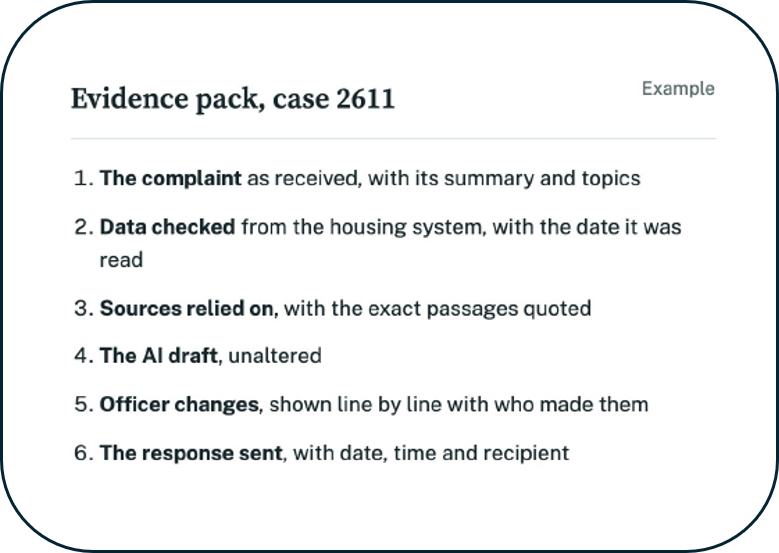
Every case builds its own evidence pack as it goes. It shows what was checked, which policies were relied on, what the AI drafted, what your officer changed and what was sent, all dated.
It exports as a PDF and attaches to the case in your housing system, so nobody has to reconstruct the story months later.
Learn from every complaint, not just the ones that escalate
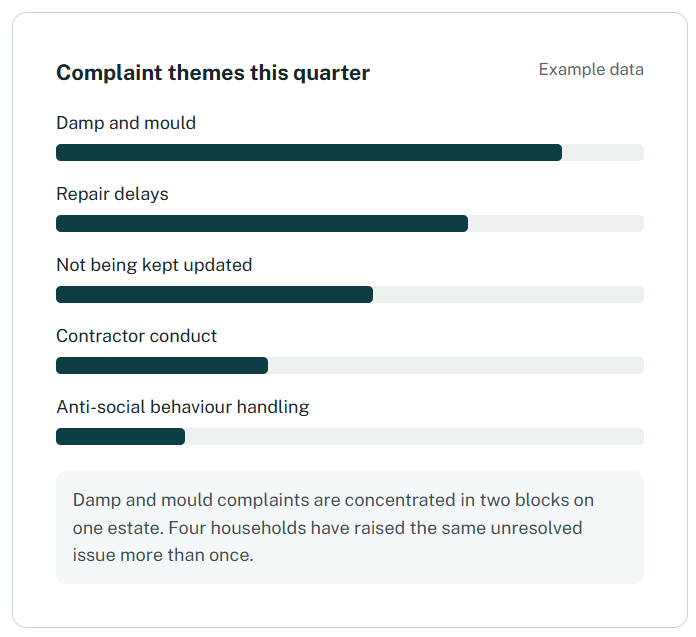
Most complaint reports rely on a category somebody picked from a drop-down in a hurry. We read what residents actually wrote, so you can see where problems cluster, which contractors keep coming up and which issues bring the same households back again and again.
The same insight feeds your annual complaints and service improvement report, your self-assessment against the Code and your reports to the board and Member Responsible for Complaints.
Keep your housing system as the record. We do the hard work in between.
KnowledgeFlow Complaints doesn’t replace your housing management system. Cases, stages, dates and outcomes stay where they are, and your statutory reporting carries on as before. Nobody types anything twice.
Stays in your housing system
- Case reference and stage
- Key dates and the outcome
- The final response letter
- The evidence pack, attached as a PDF
Happens in KnowledgeFlow
- Reading, summarising and routing
- Checking your data
- Drafting with citations
- Officer edits and approval
- Theme and root cause analysis
Start small and connect as you go
Start
Your policies and the Code
Live within 10 days. Drafts are grounded in your policies and regulation, and officers add the case detail.
Connect
Your data, refreshed daily
We read from your reporting database or data warehouse. Every draft shows when the data was last refreshed.
Integrate
A live connection
Case details are read in real time, and cases are created and updated in your housing system automatically.
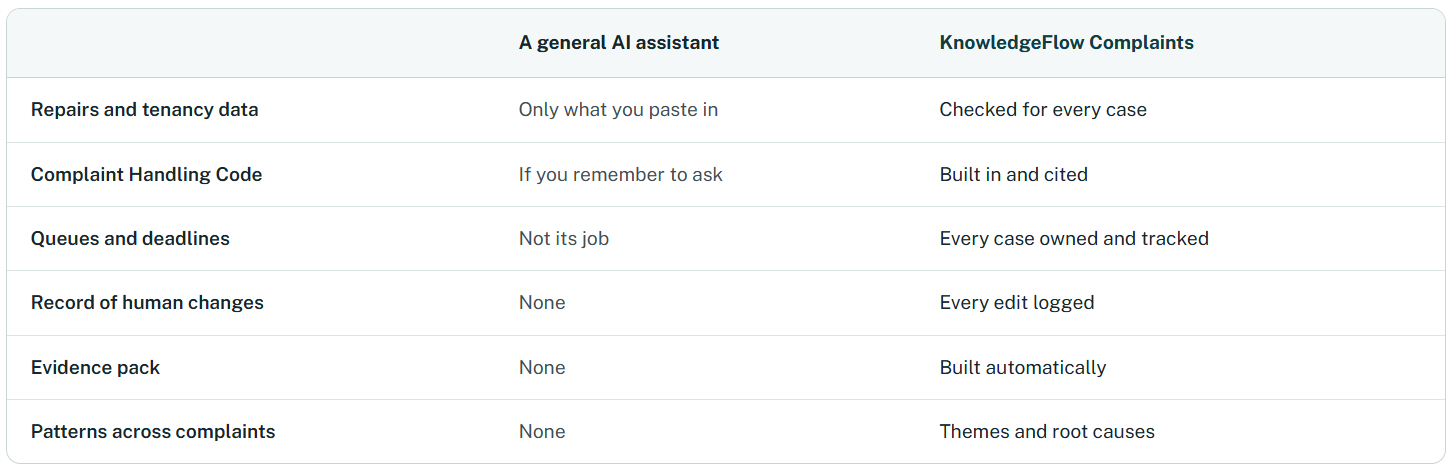
Copilot helps your staff write emails. This runs your complaints process.
We like Copilot, and we run on Microsoft Azure too. But a general assistant in someone’s inbox can only work with what they paste into it.
AI your board can sign off
Your own Azure tenant
Deployed in your Microsoft environment, in UK South.
ISO 27001 and ISO 42001
Certified for information security and AI management.
AI Impact Assessment
Completed for your deployment as standard, ready for your DPO and board.
Your data stays yours
Nothing is shared with public AI models or used to train them. Retention follows your own policy, and subject access requests are covered.
FAQs
No. Every response is approved by a named officer before it goes, and the record shows who approved it.
That’s your decision, but we’d recommend saying so in your complaints policy. The evidence pack shows exactly how AI was used on each case, which makes that an easy conversation.
Yes. Most systems still have a reporting database or a nightly export we can read from. If not, you can start with your policies and the Code and connect later.
No. Your module stays the record. We take on the reading, checking and drafting, then pass the case and its evidence back.
Yes, with the relevant regulators and complaint codes built in. Ask about complaints for colleges and complaints for councils.
See it answer one of your own complaints
Bring a few anonymised complaints from the last year. We’ll show you the drafts, the citations and the evidence pack, using your policies. If it isn’t right for you, we’ll tell you.